
FCD600 Privacy Mask

Hi I bought 4 pcs. FCD600. Excellent product!
After intallation I noticed that I'm spotting my nighbours - what I don't want...
Refer to picture, yellow area...
Guarding Vision Client setup states, that the camara fcd600 doesn't support PRIVACY MASK..
Any updates available, enabling privacy mask for these camaras?
How to solve the problem?
Thanks in advance & regards froma Germany!
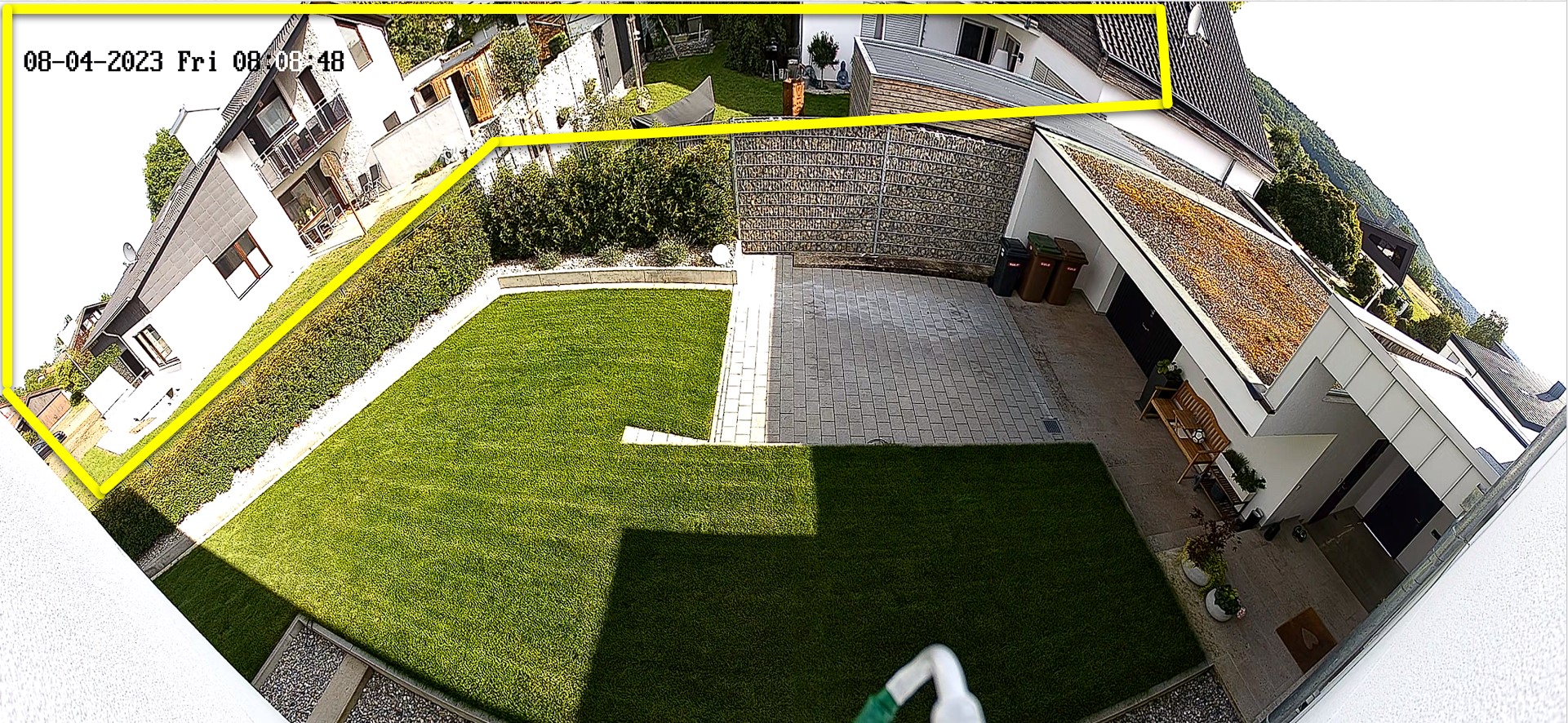
-

Sorry to see you have had no Replies
So I am going to guess that the App means it isn't able to make a Mask for it. I find it hard to believe that the camera in Question don't have a P Mask..
I don't have that camera and to be honest I don't have any IP camera from Annke. But I do have same type Tech from another provider of same tech and I will tell you how I get to my Mask using that camera and you might be able to find it the same place on your own. My camera (again like yours) isn't the easiest to find the Mask area...
To access the Mask you will need to gain access to the cameras WebUI. If you have it connected to your normal Network using a POE Switch or some other Power supply then it will be easier. If you don't and you have it connected to a Annke POE NVR. Then you will have to access the cameras WebUI. This might be a feature of the NVR as it is on my Other Branded NVR through a Virtual Host setting. Once you are able to bring up your Cameras WebUI log into the Camera.
Sorry looking at mine again it isn't 100% like yours and my placement of my Mask might be different then yours seeing my first one I went to is under PTZ tab of the Camera.. SO I will look at another camera.. Either way you want to look in your cameras WebUI for the mask and it is a setup and forget kind of thing. meaning you only need to worry about turning one once...
So looking at one again that is kind of like yours. I have the Mask under WebUI, Configuration, Image and Privacy Mask...
You will want to Enable it, Then under the little window you will have a button that says Draw. Click that and enter your area to be masked...
Also keep in mind that you will want to Draw in your Events area for motion or if you have setup with VCA and setup the area within the area of VIEW you want.. Also keep in mind that if your camera offers a ROI you can draw in your area and it will keep that area better in picture and not outside of your interest area...
-
Yeah connected to a NVR there should be a way to also setup a Mask in the NVR as well. However if the NVR isn't related to the camera that might be little harder for the NVR to know where to find the mask data.. So for my system my NVR can do Motion settings and a few other things. However on some cameras like my first one that I looked where the Mask is under PTZ I can't do Mask VIA my NVR or I can but will only mast the picture of the NVR and not in the camera. Hard to explain. Where my other one it will mask and setup in the camera as well but it is understood in the Camera that it is a mask. With PTZ one when I move camera from home position the Mask stays there. I also have ability to setup mask in different Presets of the camera so that is why the NVR don't do that Mask.. Your camera being as new as it is with 2 lenses it might be kind of same thing where it would normally be able to setup in your NVR or App, However right now would need to from WebUI because of placement of the Mask settings and if a future Firmware is released for the NVR it might fill in the missing data for that type of cameras masking..

Please sign in to leave a comment.
Comments
4 comments