
Annke IP Camera (F300) 81CK - App Notifications - Alexa - DW81KD

I have problem with my Wifi Pan & Tilt 2 way audio Camera. I have this situated at my front door, i had hoped to use it to answer the door at night or away from home!
It connected to my DVR (DW81KD) I can view it on the monitor and via Annke Vision App, I also have it set up on My Annke App.
I tried connecting the camera to Echo Show But there was a 5 to 10 minute time delay so that was no good!
My Annke doesn't send notifications unless the App is open on the phone, Pointless as I don't want to sit with this open on my phone.
Annke vision Sends no notifications for the IP camera.
Does anyone have any ideas to make this camera fit for purpose. I feel I have wasted my money on this camera, should have just gone for a ring doorbell instead!
-

Yes Ring Doorbell. This way all your footage is at the Police Finger tips without your permission. That is a great answer.
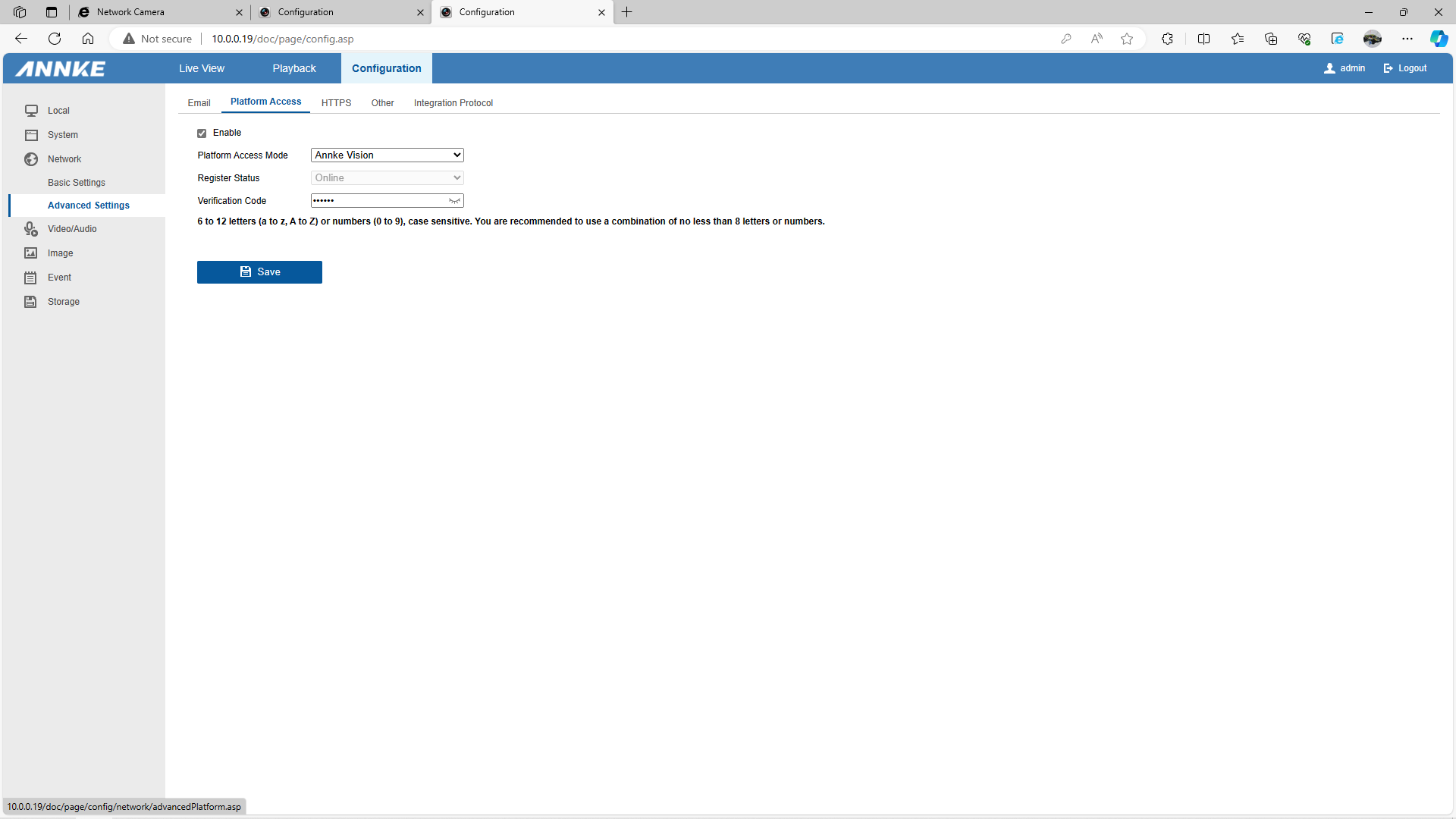
So sounds like you might want to look at your phones setting for both your DVR and your Wifi Camera. Seeing all my cameras and I have more then the normal user will contact me if my phone is awake or just been chilling in my pocket asleep for the last 2+ hours. At times within the App world an update to your phone can put the apps to rest and will need to have permissions turned back on to wake your phone. Make sure the app has the permission and also make sure that you setup your device to your app right. Most times if you don't setup a device with P2P by scanning the devices SN and you just entered the devices IP address the device will only be able to contact the app if the phone and device are on the same Network. In your 81KD you will want to look at the setup type and make sure that it is connected to the Annke Server AKA Annke Vision server. I was connected to this one however I have a few other 81KD, This is an older Firmware but both new and old look same as picture below
-
Current situation, I received this from Tech Support
"After confirmed with our product manager, we are sorry to inform you that the problem is caused by the compatibility of the DVR and camera I81CK.
Currently, we don't have a solution regarding this issue."So basically no help.
I've removed the camera from The DVR and Annke Vision App.
I've managed to get the camera to link with Alexa on the Echo show with no time lags, but still can't get any notifications from there either!
Am I using the right Annke App (Currently using MyAnnke on Samsung galaxy s22)
All permissions checked on Apps.
-
I can't say that MyAnnke is the right app or not. I will be honest that there seems to be some hardware to app changes that I wish I would have known about personally when I bought my last Annke camera because when I got it installed and then tried to use the app I have been using for my 81KD DVR's and other cameras I have from Annke that app didn't know the device and wasn't able to find the device and I was like WHAT? I mean the app I have to use for a 20x zoom PTZ camera from Annke is the Annke Smart app and to be honest it is kind of strange to have what I thought and kind of acts like a normal IP camera requires an app that on other platforms are for a totally different non IP based camera device. Like what I think smart, I am thinking my Doorbell camera, My Floodlight camera, my Dog Camera aka a baby cam and all of these cameras have special functions that were not built on the normal app and non of them have a built in WebUI aka the ability to log into a cameras Web Server. So yeah I can't say that your app is the right one or not. If there was some Docs in the box that said to use that app then my guess is that it is right. However for my Annke IP and 81KD DVR's I use the Annke Vision app. That is the same type app that Hikvision has and other OEM Hikvision providers use like Guarding Vision and Hik Connect. If you happen to have Annke Vision I would personally look at using that. If you don't the next thing you could try to do (However would be limited to access only IP mode) Is DL and trying to access the camera on HiK-Connect. again you would have to use this on Local Ip setup only but might be able to turn on the Motion alerts that you are looking for.
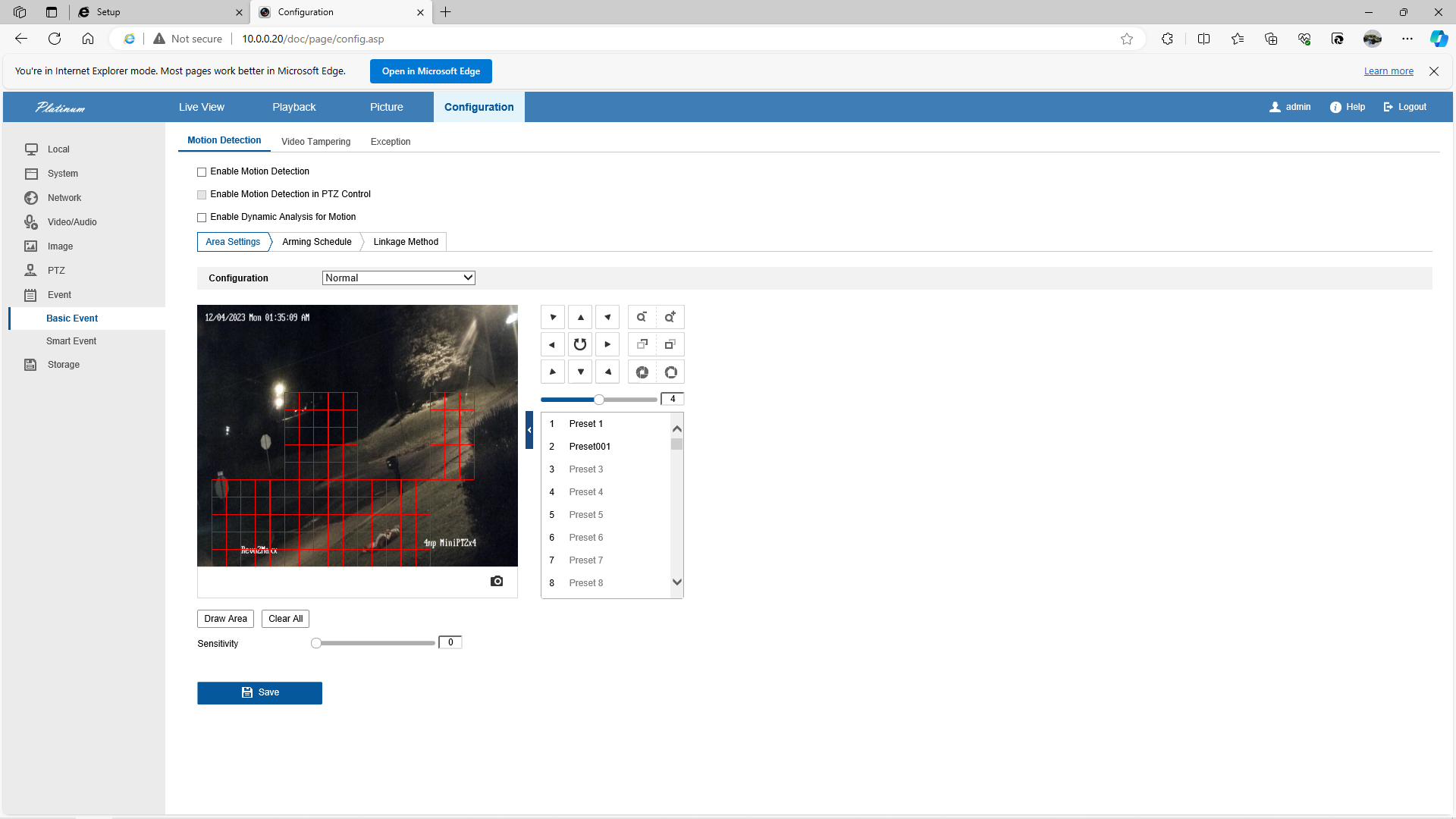
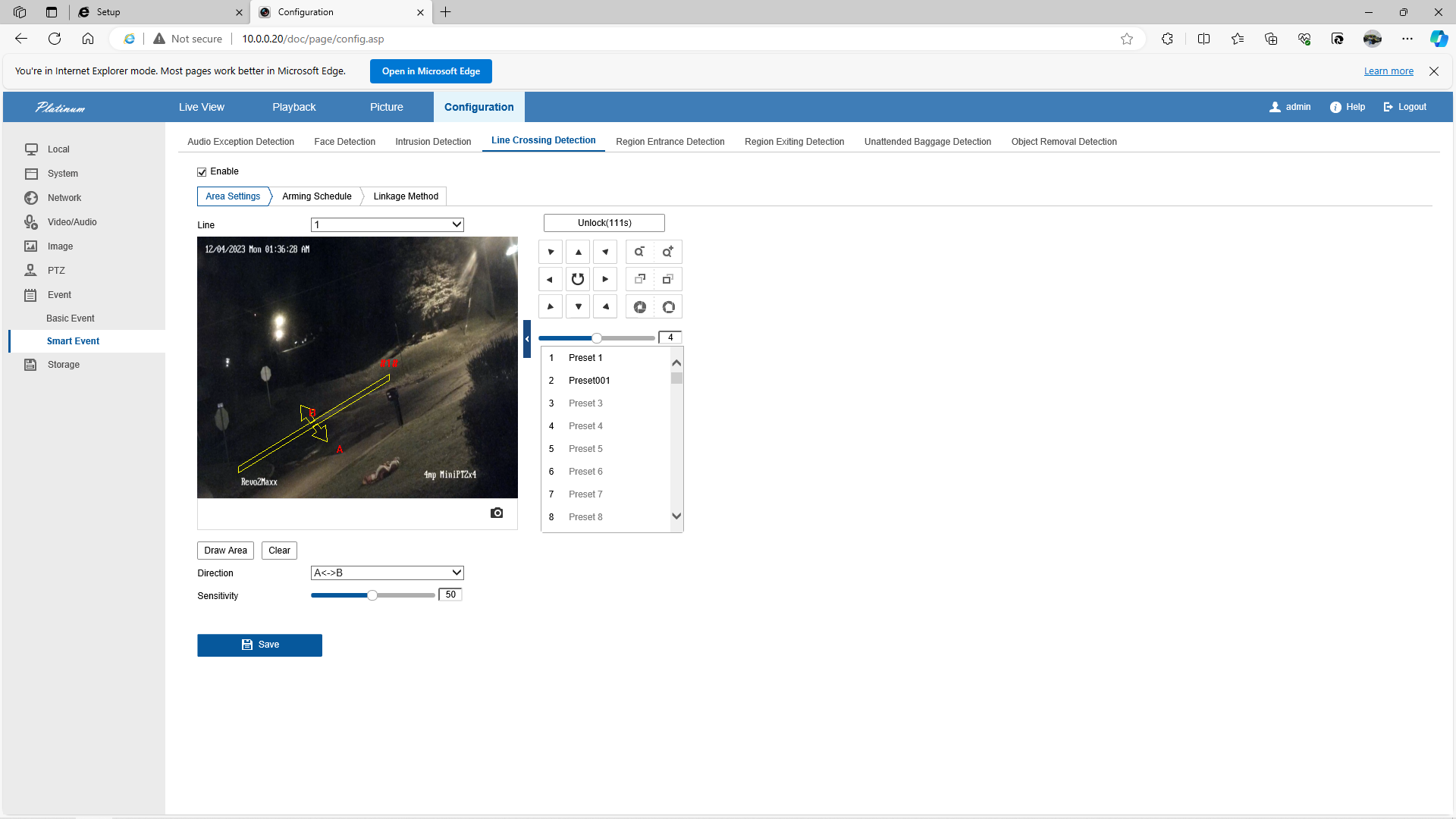
Next and I am again not sure as I don't have this Device, I would check to see if the camera has a WebUI by going to the cameras IP address in your browser. keep in mind that you might want to setup in Edge using IE Mode setting because there might be things that are missing in Chrome or the normal Edge setup. If you can access the WebUI of the camera over the IP, you will want to on the left hand side go to Event, then make sure that your Motion Grid is enabled. Now keep in mind that the 2 pictures below show one of my cameras that is not Annke however does have Annke setings type and in the motion page you see that I don't have it enabled. This is because I use this camera on a NVR and in BI that uses the NVR and BI as the platform for events. in the second picture you can see the camera is setup with VCA enabled for line crossing. Depending on how you setup your camera it might be that either you don't have a Grid setup or your motion isn't enabled. You will want to Enable and save. Also keep in mind that mine is an Advanced PTZ camera where I can setup different rules per preset and schedule times for different presets. Also Bi *AkA Blue Iris* is setup to run different presets different times of day and doing so lets me access different rules on them times. so might not look like yours if you have the Smart Events tab.
-

Great review! I’ve been using the Annke IP Camera (F300) 81CK for a few months now and agree that the app notifications are reliable and timely. It's reassuring to get instant alerts when motion is detected, adding an extra layer of security. Highly recommend this camera for anyone looking to enhance their home surveillance setup!

Please sign in to leave a comment.
Comments
5 comments