
Swapping NVR camera numbers

I have an Annke WS300 NVR with 6 cameras. How do I swap say Cam 3 to become Cam 1 so that it appears in the top left corner of the monitor screen without having to physically exchange the two cameras?
-

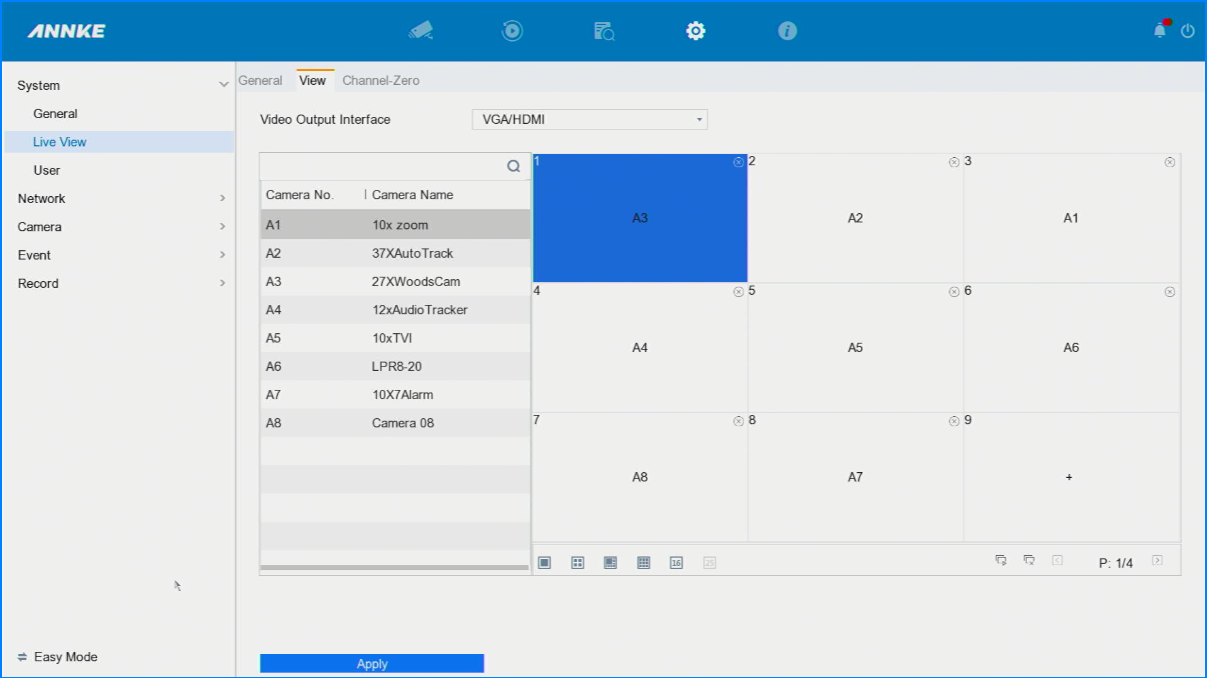
Well seeing you have not had an answer after 14 days I am sure you already figured this out. However incase you didn't or others that have come here looking for that same answer I will tell you I do it on my Annke system. I can't say yours looks the same or that this is how it works for your system. However I have more then just Annke recorders and some I have had since 2010 and it is about the same on that system. Not as easy as it is on the Annke but same Concept. In my older system i am able to access on WebUI in the Annke I can't find it in there, I am not saying it isn't there I just can't find it so I will show you how from the GUI using the Recorder. You will want to log in, Click on the Cog or System Menu, Then could be already on System click on the Live View, Then click on the VIEW at the top of that page. Then in there you will see a Grid Layout. Then in there you can see I have my Camera 3 in Cam1 spot I also have 7 and 8 moved as well. What you want to do is click on Ch1 in the Grid, on the left side double click on the CH3 in my Picture is it my 27xWoods Camera. This will then move in your case D3 to space 1, then if you want 1 at space 3 click on the Grid of 3 that is now showing a + again double click on D1 to put it in that space. Once you are done press the Apply button at the Bottom of the page.
Please sign in to leave a comment.
Comments
1 comment