
View system from a PC at another location

Hi, I need your help if possible. I have two systems at different locations, and I want to be able to view them from my PC, not just from the mobile app. Can anyone help me with this?-

Dear Customer,
Have a nice day.
Could you please tell us the model number of your system? Then we can give you a solution accordingly.
You can find the model number on the backside of the DVR/NVR.
Here is a picture to show you how to find the model number.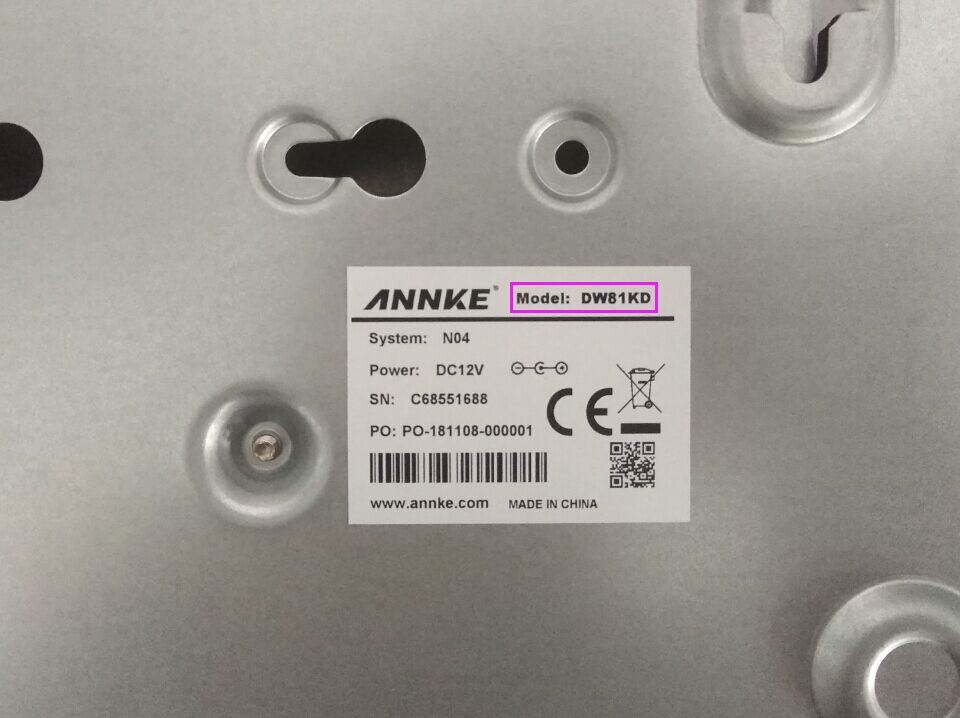
And if you have any questions, do not hesitate to contact us at support@annke.com.
Best regards!
Echo | Technical Support
-
Dear Customer,
Have a nice day.
Thank you for telling me the model.
Here is an instruction of connecting dvr to your annke vision software on computer. Please check.
If you need to manage your dvr remotely, please use the second method.
https://help.annke.com/hc/en-us/articles/8424342826777---Access the DVR/NVR System via ANNKE Vision Software on PC (Via IP Address)
https://help.annke.com/hc/en-us/articles/8426542605977---Access the DVR/NVR System via ANNKE Vision software on PC (Via P2P Cloud)
If you are using an imac computer, please download guarding vision instead of annke vision. Here are instructions for your reference.
If you need to manage your dvr remotely, please use the first method.
https://help.annke.com/hc/en-us/articles/4405215514905---Access the DVR/NVR/IP camera via Guarding Vision software on PC (Via P2P Cloud)
https://help.annke.com/hc/en-us/articles/360000252441---Access the DVR/NVR/IP Camera via Guarding Vision Software on PC (Via IP Address)And if you have any questions, do not hesitate to contact us at support@annke.com.
Best regards!
Echo | Technical Support
Please sign in to leave a comment.
Comments
3 comments