
Synology NAS Mapping

My HD in my NVR died, I bought a new one but that is noisy so it's going back, but that means I will be without a HD & recording whilst it's being replaced. I have a Synology NAS which I managed to map using the instructions https://help.annke.com/hc/en-us/articles/4413124873881-ANNKE-VISION-How-to-Connect-The-IP-POE-Camera-to-NAS However it's advising that I have 2Tb on the NAS (which is correct), but it's advising that it's unformatted, I don't want to format it & lose all my other data on the NAS.
Does any one have any experience here, I tried Live Chat, but that's a waste of time there is never anybody there.
-

Dear Customer,
Have a nice day.
Could you please tell us the model number of your system? Then we can give you a solution accordingly.
You can find the model number on the backside of the NVR.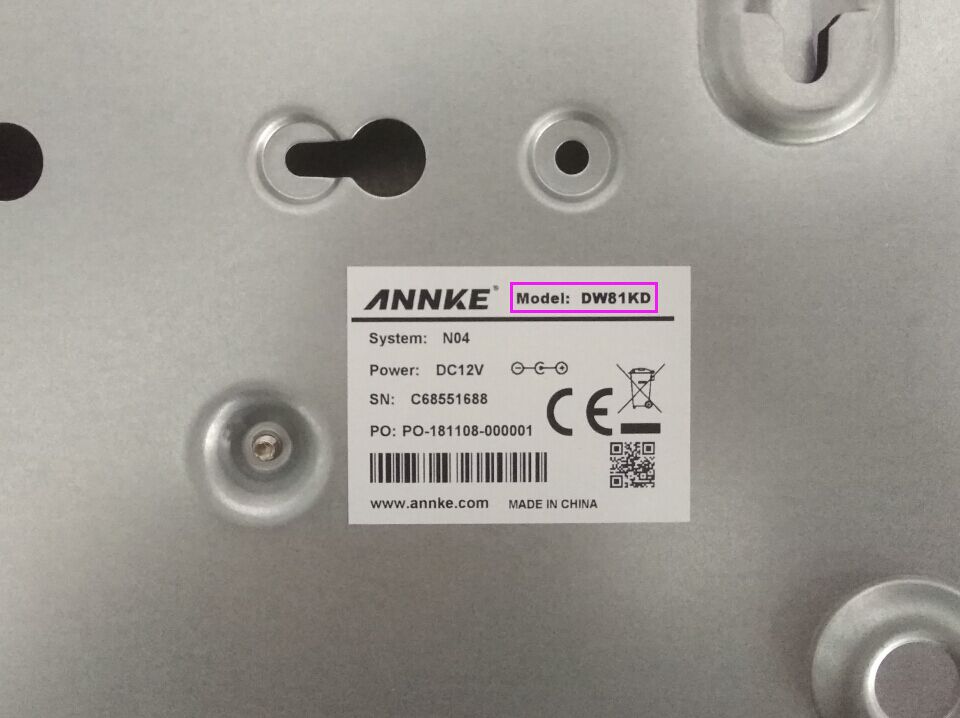
And if you have any questions, do not hesitate to contact us support@annke.com.
Best regards!
Echo | Technical Support
-
Dear Customer,
Have a nice day.
Thank you for the information.
I'm sorry to inform you that formatting is a necessary step.
However, if you have configured the addition of a specific file path to our NVR, the formatting will only affect that file path and will not impact other data on your NAS.And if you have any questions, do not hesitate to contact us at support@annke.com.
Best regards!
Echo | Technical Support
Please sign in to leave a comment.
Comments
3 comments